
AI is coming 💣

AI (artificial intelligence) is really coming in this year! With the development of AI technology, a platform called Chatgpt was released, which flooded the screen and became a trending topic in social media. There is nothing you can't do and it doesn't know. 
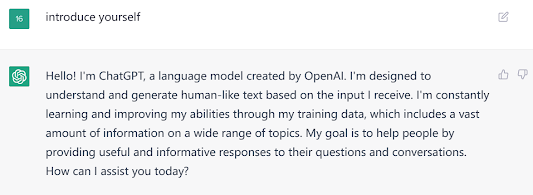

Introduction

Chatgpt is a so powerful tool that you can talk with it about any topic. It can not only provide you the answers but also learn from the conversations with people and generate human-like text based on the input it receive. It's not like a search engine that you have to search the information you need from a mass of data. Your expression will be understood and responded within several seconds.

Let's see what Chatgpt introduce itself.


English teaching context

Like I said above, Chatgpt almost can do everything, which definitely includes offering support and help in English teaching context. Let's start with its response to "what you can do in English language teaching context".


Moreover, there are unlimited potentials waiting for people to discover and create. The Chatgpt itself is still learning and accumulating more and more knowledge. It can't image what AI can do in ten years.

Limitations

The Chatgpt is so poweful that people can easily be addicted to it and stop thinking anymore. The students who use it improperly can lead to plagiarizing. In recent stage, people have not completely developed the entire function of Chatgpt, which means there is a long way to be applied to education. In addition, many scholars are doubtful about using AI to teach and create, resulting in some schools forbid students and teachers using it.


Feel free to comment. I believe AI would benefit everyone in the future, what about you?

Comments

  1. Thank you for your sharing. AI is so smart right now just can't believe it.

    ReplyDelete

Post a Comment

Popular posts from this blog

Pronounce every word accurately

 Have you ever been troubled with your pronunciation? Youglish will be the best tool for you to learn how to pronunce every word accurately with real context. https://youglish.com/ Introduction After you enter the website, you just need to put the word or phrase in the search box and click "say it". Then it will show you a video that a speaker says the word or phrase you typed. Moreover, there are all kinds of accents you can select. You can choose your favorite accent, listen to videos and practice through repetition. Below the video, the definition, nearby words and phonetic transcription are presented for you to know more about the word or phrase. Also you can see the tips to improve your pronunciation at the end.  How to use it in classroom The basic use of Youglish is to show students the word or phrase they want to learn. The process can include pronunciation practice, vocabulary learning and listening comprehension. It gives many possibilities for teachers to motivate ...

Say Hello to Blog! 💛

Well, I am brand new person to blog world, hoping to find something interesting and  enjoying the time of reading others' blogs as well as successfully finishing my ICT in TESOL course. 😎 I will give my reviews about what blog is according to some bloggers' post from following points: Organisation and Layout: Most of blogs should be as clear as possible to instruct readers and make it more readable. Sometimes you use title, subtile and spaces to create a explicit structure of your blog. Otherwise you can also insert some pictures or quote others' words for a better layout. Cotent and Features: I do not fully understand what blog's content should be now. However, I believe that it is some kinds of tools that teach something and give your personal views. It provides a place for people who are interested in same field to communicate and learn form each other. It can be any form as you like and you don't need pretend to be the best. Just be yourself and do with your s...

Create as you wish!

Today I am going to intorduce a platform that allows users to create interactive and visually appealing content such as presentations, infographics, quizzes, games and animations. You can use it to design whatever you like and make it be a part of your classroom. Let's see how we can use it. Introduction The platform is called "genially". First of all, register an account of "genially" and then you will see a lot of things you can create, including presentations, infographics and so on. After you choose one of them, there will be many template offered for you. One of the powerful features is that it's easy to create and edit content you want.  My favorite function I love the gamification part that gives many possibilities in classroom. Instead of testing your students with basic quizzes, I prefer creating some interesting games by utilizing cartoons and animations to attract students' attention. Moreover, the games in your classroom can not only be a qui...